
H2OSupport can read and collect data very efficiently, the modern analog sensors get more and more precise every year and the digital sensors can do the quasi totality of the work. But what about H2OSupport’s ability to connect to a certain network and transfer all of the data?
The MKR1500 has an on-board U-blox module, which goes by the name and model SARA-R410M-02B [1]. This semiconductor component allows the Arduino board to wirelessly connect to networks, such as NB-IoT and Cat-M1. The SARA-R410M uses the Soracom SIM card to access these networks.
Since Arduino is a microcontroller, we can directly communicate with the U-blox module with the Arduino IDE. The MKRNB library contains a SARA Passthrough example sketch that is very useful for this specific purpose. The U-blox modules respond to something we call “AT commands”. These commands, or instructions, are used to communicate with modems. Here are some of the useful AT commands I used to set-up the on-board module:
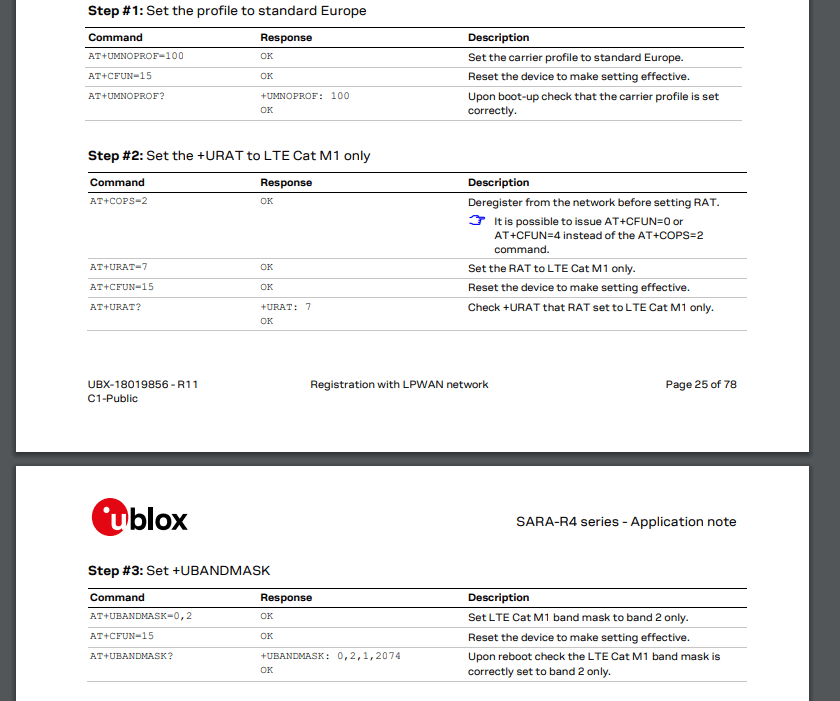
There is a plethora of AT commands, some can be very redundant, but it’s very important to read through the documentation before plastering the modem with all sorts of commands.
An interesting and extremely useful command is “AT+COPS=?”. This command will list all (if any) possible carriers to connect to. Since this project is meant to work even in the most rural areas, I decided to choose Rogers Wireless and Bell Mobility as a second option because these carriers have the most cellular network towers in all of Canada.
Sources
[1] U-blox, “SARA-R4 Series”, LTE-M / NB-IoT / EGPRS modules with Secure Cloud. [Online]. Available: https://www.u-blox.com/en/product/sara-r4-series
[2] U-blox, “AT Commands Manual”, SARA-R4 Series. [Online]. Available: https://www.u-blox.com/sites/default/files/SARA-R4_ATCommands_UBX-17003787.pdf

 H2OSupport